Human code review
Published:
Code review is a critical part of the software development process. Here are some best practices to make code reviews more effective and collaborative.
1. Automate repetitive tasks
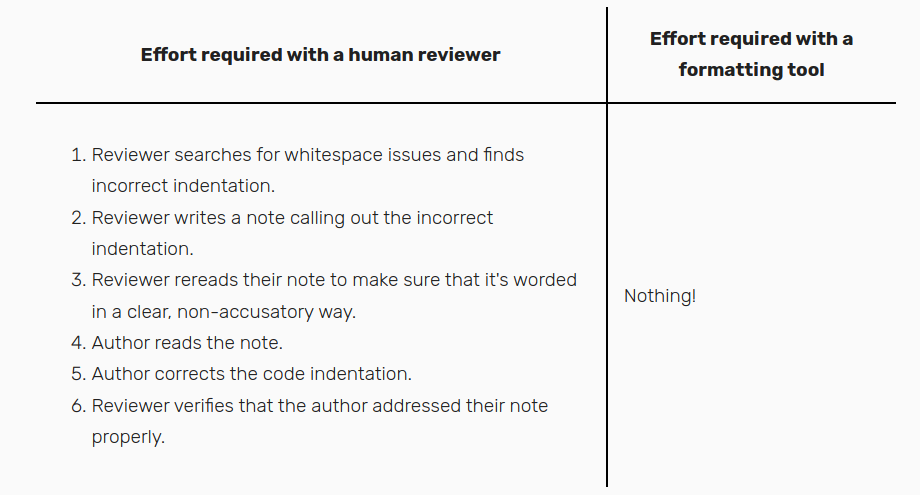
- Use tools to identify whitespace errors, unused imports, and other mechanical issues, freeing up time for more meaningful feedback.
2. Establish a style guide
- Define coding conventions to avoid unnecessary arguments about style preferences.
- https://google.github.io/styleguide/javaguide.html
3. Start reviews promptly
- Begin reviewing code as soon as it’s submitted to avoid delays and encourage smaller, more manageable changelists.
4. Focus on high-level issues first
- Start by addressing major design or architectural concerns before diving into lower-level details.
- If you’re worried about drowning the author in a sea of notes, restrict yourself to high-level feedback in the early rounds. Focus on issues like redesigning a class interface or splitting up complex functions.
- Wait until those issues are resolved before tackling lower-level issues, such as variable naming or clarity of code comments.
5. Provide code examples
- Demonstrate improvements by writing out code snippets or creating sample implementations.
- Responding, “Can we simplify this with a list comprehension?” will annoy them because now they have to spend 20 minutes researching something they’ve never used before.
  urls = []
  for path in paths:
  url = 'https://'
  url += domain
  url += path
  urls.append(url)
They will be much happier to receive a note like the following: “Consider simplifying with a list comprehension like this”
urls = ['https://' + domain + path for path in paths]Reserve this technique for clear, uncontroversial improvements.
6. Avoid using “you”
- Frame feedback in a way that focuses on the code itself, not the author, to minimize defensiveness.
- Option 1: Replace ‘you’ with ‘we’
- Option 2: Remove the subject from the sentence
7. Use requests instead of commands
Phrase feedback as suggestions or questions to foster a collaborative atmosphere.
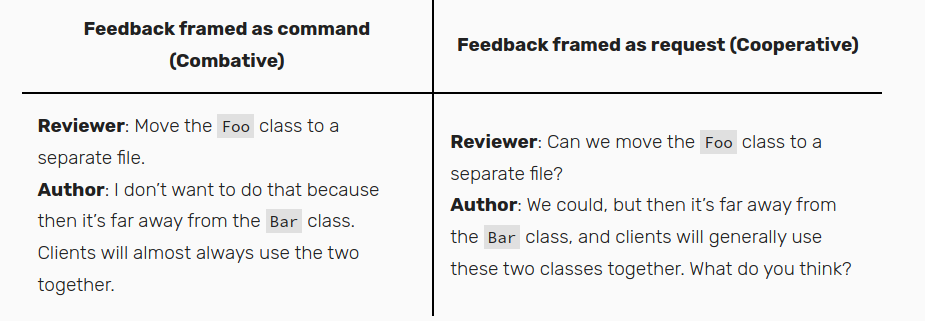
Explain the reasoning behind your suggestions by referencing coding principles or best practices.
8. Aim to bring the code up a letter grade or two
I privately think of the code in terms of letter grades, from A to F. When I receive a changelist that starts at a D, I try to help the author bring it to a C or a B-. Not perfect, but good enough.
It’s possible, in theory, to bring a D up to an A+, but it will probably take upwards of eight rounds of review. By the end, the author will hate you and never want to send you code again.
9. Limit feedback on repeated patterns
- When you notice that several of the author’s mistakes fit the same pattern, don’t flag every single instance.
- It’s fine to call out two or three separate instances of a pattern. For anything more than that, just ask the author to fix the pattern rather than each particular occurrence.
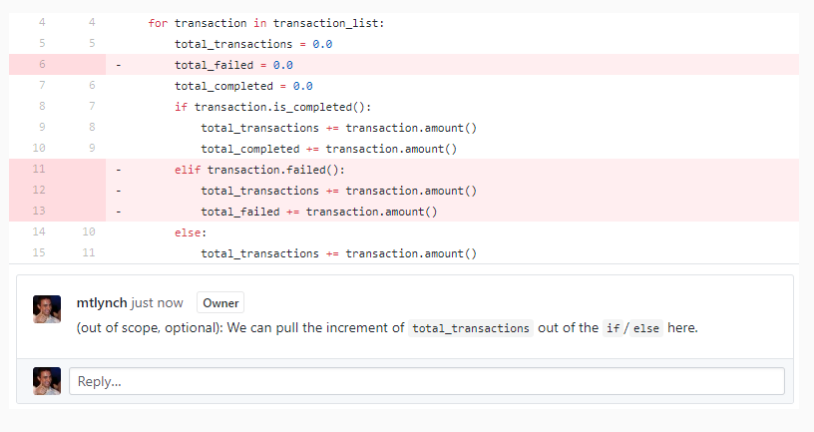
10. Respect the scope of the review
If you’re reviewing a small change, don’t ask for a complete rewrite of the module.

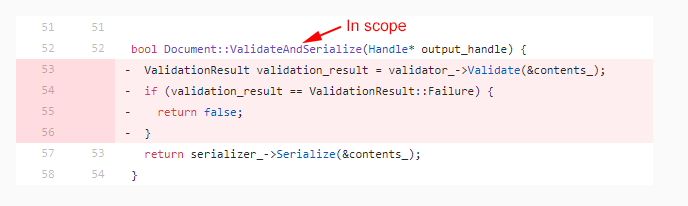
Could comment optionally
11. Split up large reviews
- I personally refuse to review any changelists that exceed 1,000 lines.
12. Offer sincere praise
- Most reviewers focus only on what’s wrong with the code, but reviews are a valuable opportunity to reinforce positive behaviors.
- Example:
- “I wasn’t aware of this API. That’s really useful!”
- “This is an elegant solution. I never would have thought of that.”
- “Breaking up this function was a great idea. It’s so much simpler now.”
13. Handle stalemates proactively
- Talk it out
- Consider a design review
- If the root of the disagreement traces back to a high-level design choice, the broader team should weigh in rather than leave it in the hands of the two people who happen to be in the code review.
- Concede or Escalate
- If concession is not an option, talk to the author about escalating the discussion to your team’s manager or tech lead. Offer to reassign to a different reviewer
14. Review your own code first
- Before sending code to your teammate, read it yourself
- Adopt your reviewer’s environment as much as possible. Use the same diff view that they’ll see. It’s easier to catch dumb mistakes in a diff view than in your regular source editor.
15. Write a clear change list description
- Your changelist description should summarize any background knowledge the reader needs
- A good changelist description explains what the change achieves, at a high level, and why you’re making this change.
16. Automate repetitive tasks
- Add git pre-commit hooks, linters, and formatters to your development environment to ensure that your code observes proper conventions and preserves intended behavior on each commit.
17. Answer questions with the code itself
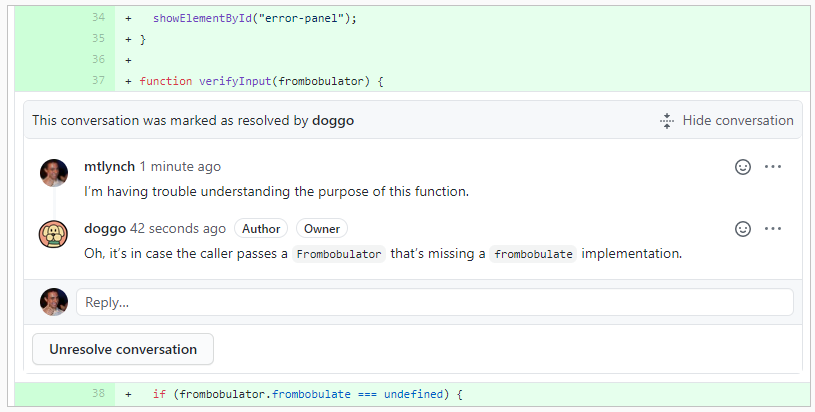
- When your reviewer expresses confusion about how the code works, the solution isn’t to explain it to that one person. You need to explain it to everyone.
- The best way to answer someone’s question is to refactor the code and eliminate the confusion.
- Can you rename things or restructure logic to make it more clear? Code comments are an acceptable solution, but they’re strictly inferior to code that documents itself naturally.
18. Narrowly scope change && break up large changelists
- The best changelists just Do One Thing. The smaller and simpler the change, the easier it is for the reviewer to keep all the context in their head
19. Separate functional and non-functional changes
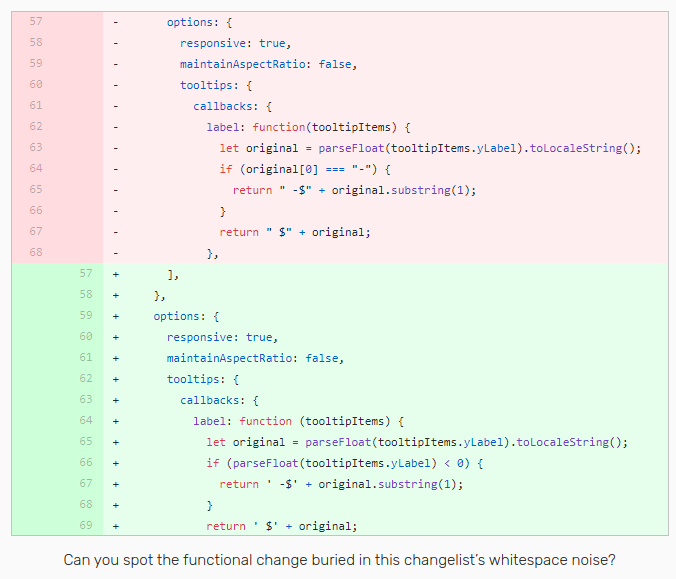
- Developers also tend to mix changes inappropriately while refactoring
- Should separate behavioral changes vs refactoring ones.
20. Be patient when your reviewer is wrong
- From time to time, reviewers are flat out wrong. Just as you can accidentally write buggy code, your reviewer can misunderstand correct code.
- Look for ways to refactor the code, or add comments that make the code more obviously correct. If the confusion stems from obscure language features, rewrite your code using mechanisms that are intelligible to non-experts.
21. Artfully solicit missing information
- When you receive a comment like, “This function is confusing,” you probably wonder what “confusing” means, exactly. Is the function too long? Is the name unclear? Does it require more documentation?
- “What changes would be helpful?”
- I love this response because it signals a lack of defensiveness and openness to criticism. Whenever a reviewer gives me unclear feedback, I always respond with some variation of, “What would be helpful?”
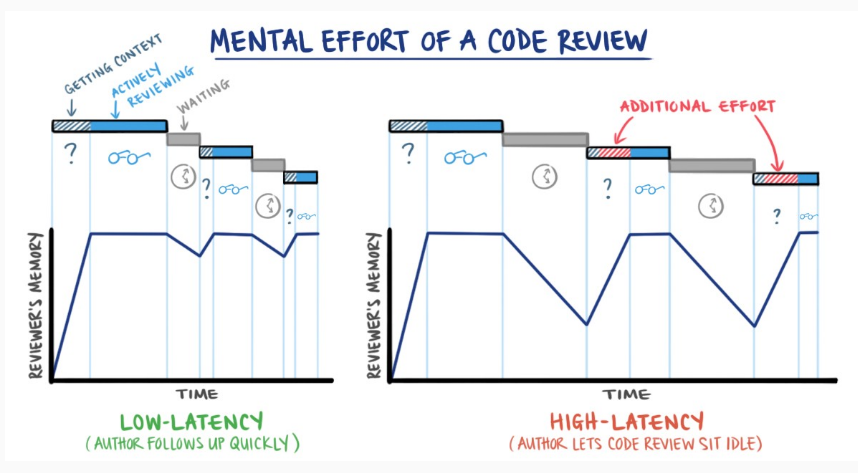
21. Minimize lag between rounds of review
References
Honestly I don’t remember where I learned most of these practices. I’ve picked them up from various articles on the internet.
Leave a Comment