Introduction to Apache Maven
Published:
This article provides a comprehensive introduction to Apache Maven, a powerful build automation tool widely used in Java projects. It covers the basics of Maven, including its standard directory layout, installation process, dependency management, and build lifecycle.
1. Maven introduction
1.1. Standard directory layout

Typical build actions of Maven
- Generate source code’s documentation
- Compile source code
- Package the compiled code as JAR/WAR/EAR
- Deploy the artifact on to a server
Benefits of using Maven
- Dependency Management
- Extensible with plugins
- Versioning
- Performance: Maven helps in building the project in efficient manner, by incorporating parallel execution of independent tasks.
1.2. Installation
JAVA_HOME = JDK HOME DIRECTORY
M2_HOME = MAVEN HOME DIRECTORY
M2 = $M2_HOME/bin
- NOTE:
- Adding dependency tag in pom.xml will download the desired artifact (JAR) file into ~/.m2/repository
- run
mvn installwill copy JAR into the local repository’s group-id folder path in ~/.m2/repository - refer to the
localRepositorytag of settings.xml of Maven to change the default location of the local repository.
1.3. Central Maven Repo guide
https://maven.apache.org/repository/guide-central-repository-upload.html
1.4. Terminologies
Archetype: Predefined project structure (for different type of project)Group ID: Keep this unique within the organization and possibly the world, usually domain name is used (eg. com.google, …)Artifact ID: Basically project name (eg. my-proj, …)Version: the project version (eg. 0.0.1, 0.0.1-SNAPHSHOT, …)Package: best practices to have the Group ID, being followed by the Artifact ID (eg. com.google.analytics, …)
Create a new Maven project from archetype
mvn archetype:generate
  -DarchetypeGroupId=vn.com.viettel.vds.archetype                \
  -DarchetypeArtifactId=vds-spring-archetype          \
  -DarchetypeVersion=0.0.1-SNAPSHOT                \
  -DgroupId=my.groupid                                \
  -DartifactId=my-artifact \
  -Dversion=1.0.0 \
  -DinteractiveMode=false
2. Dependency Management
<dependency>
    <groupId>javax.servlet</groupId>
    <artifactId>servlet-api</artifactId>
    <version>2.5</version>
    <scope>provided<scope>
</dependency>
2.1 Scope tag
compile
- The dependency (JAR) would be
required during the compilation timeof the project as well as during the runtime. (The JAR library will be made available in all the CLASSPATH)
provided
- We assume the library
will be made available during the run timeand that wedon't have to include it while packaging.- eg. ServletAPI.JAR is required during the compile time, but we don’t really need to package that jar file inside our war file because ServletAPI.JAR is also available as part of the Tomcat server library and is available when we run the servlet.
runtime
Certain libraries are not required during the compile timesuch as JDBC API. JDBC API is required during the compile time that helps us connect to a database, but we don’t need the actual driver implementation code during the compile time because it would be provided by the database server.
test
- Only be made available during unit testing
system
- When you have a dependency that is not part of any repository or a dependency that is external to a repository, then we call it an external dependency.
- Set this when you want to
manage dependency on your owninstead of letting Maven doing it for you. - You would also need the
to manage external dependencies.
2.2 Transitive dependencies
- Optional dependencies and Exclusions
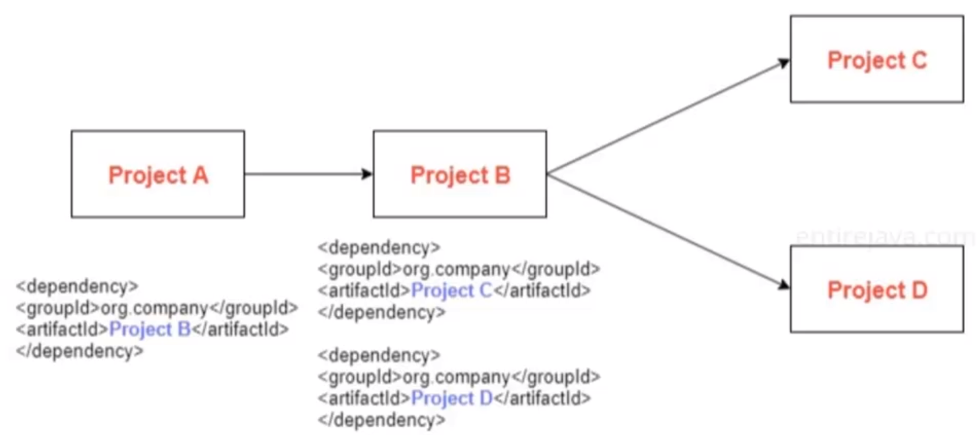
Maven would download not just dependencies, but dependencies of dependencies.
eg. Project A is transitively dependent on Project C and D. However, in some cases we may not be needing all the JAR files in order for our project to work.
For example, let’s say that Project C Java file is required for Project B in order for it to build, but is not required for our project. It’s only for the purpose of Project B completion to work.
The developers of Project B can mention that the dependency of Project C is optional, meaning that Project B is explicitly mentioning that whoever is going to mention the Project B’s dependency may not be requiring to download the Project C.
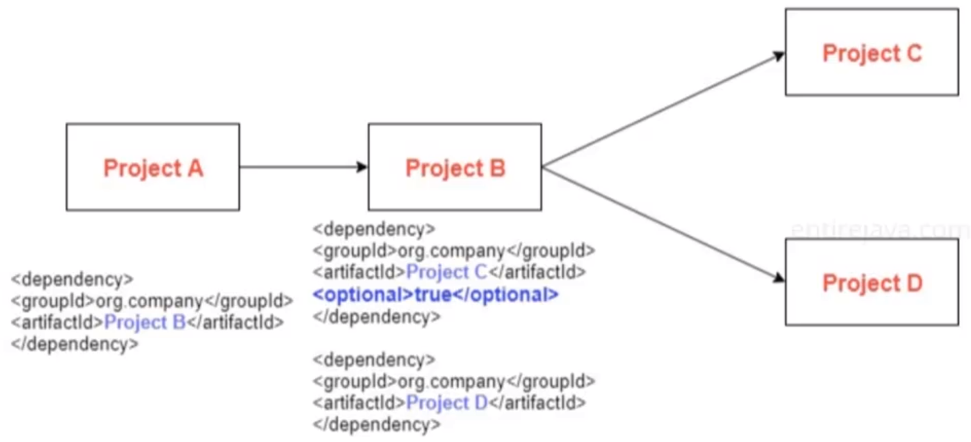
If however, if the developers of Project B forget to mention that the dependency of Project C is optional. We could manually include the
<exclusion>tag.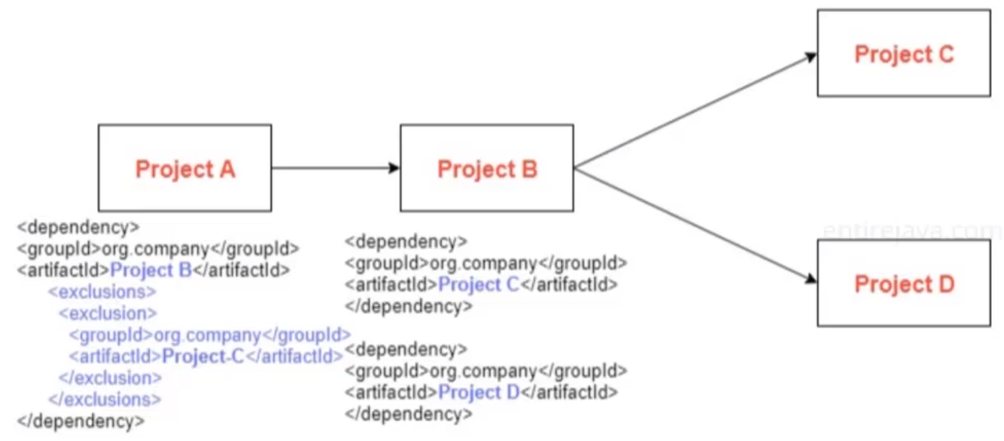
2.3. Dependencies scope
The dependencies scope will also affect the transitive dependencies.

For example:
- A has direct dependency on B with the scope of
compile - B has direct dependency on D with the scope of
runtime - This means A has transitive dependency on D with the scope of
runtime - Then the resulting scope of D on A would be of
runtimescope
- A has direct dependency on B with the scope of
3. Maven lifecycle
- Maven has 3 built-in lifecycles:
default: Build the projectclean: Clean the projectsite: Generate the project’s site documentation
3.1. A Build Lifecycle is Made Up of Phases
validate- validate the project is correct and all necessary information is availablecompile- compile the source code of the projecttest- test the compiled source code using a suitable unit testing framework. These tests should not require the code be packaged or deployedpackage- take the compiled code and package it in its distributable format, such as a JAR.verify- run any checks on results of integration tests to ensure quality criteria are metinstall- install the package into the local repository, for use as a dependency in other projects locallydeploy- done in the build environment, copies the final package to the remote repository for sharing with other developers and projects.- Combine phases to from a lifecycle
mvn clean package
3.2. Plugins
- In Maven, the
<plugins>tag is used within the<build>section of apom.xmlfile to define and configure plugins that are part of the build process. - Plugins enables you to perform a wide range of tasks during the build lifecycle, such as compiling code, running tests, packaging applications, generating documentation, and more.
<project>
    <!-- Other elements like groupId, artifactId, version, etc. -->

    <build>
        <plugins>
            <plugin>
                <groupId>plugin-group-id</groupId>
                <artifactId>plugin-artifact-id</artifactId>
                <version>plugin-version</version>
                <configuration>
                    <!-- Plugin-specific configuration -->
                </configuration>
                <executions>
                    <execution>
                        <id>execution-id</id>
                        <phase>phase</phase>
                        <goals>
                            <goal>goal-name</goal>
                        </goals>
                    </execution>
                </executions>
            </plugin>
            <!-- Additional plugins can be added here -->
        </plugins>
    </build>
</project>
Leave a Comment