MongoDB 101
Published:
This is a beginner’s guide to MongoDB, a popular NoSQL database. In this post, I will cover the basics of MongoDB, including its features, installation, and basic operations.
1. MongoDB & Document model
💡 Document = Basic unit of data in MongoDB
Collection = group of documents
Database = Container of collections
Using collections and documents instead of tables and rows (relational db) -> Can model any type of model of data, including:
- Key value
- Text
- Geopatial
- Time-series
- Graph data
- …
1.1. Document model
- Documents are displayed in JSON, stored in BSON (binary json, extends json) → adds support for more data types than JSON ( including strings, objects, arrays, booleans, nulls, dates, ObjectIds, and more)
- Documents must have _id fields (~ primary key, auto gen)
- Flexible schema - update classes to include new fields
1.2. Data relationships
- Data that is accessed together should be stored together → avoid join
Common relationships:
- 1-1: additional field
- 1-n: nested array
n-n: There are two main ways to model many-to-many relationships in MongoDB: Embedding and Referencing.
Embedding: take related data and insert into document
WARNING: data > 16MB = unbound documents
Advantages:
- Single query to retrieve data
- Single operation to update/delete data
Disadvantages:
- Data duplication
- Large documents
Example:
{ "_id": ObjectId("573a1390f29313caabcd413b"), "title": "Star Wars: Episode IV – A New Hope", "cast": [ {"actor": "Mark Hamill", "character": "Luke Skywalker"}, {"actor": "Harrison Ford", "character": "Han Solo"}, {"actor": "Carrie Fisher", "character": "Princess Leia Organa"} ] }Referencing: refer to document in another collection (same field)
Advantages:
- No data duplication
- Smaller documents
Disadvantages:
- Need to join data from multiple documents
Example:
{
    "_id": ObjectId("573a1390f29313caabcd413b"),
    "title": "Star Wars: Episode IV – A New Hope",
    "director": "George Lucas",
    "runtime": 121,
    "filming_locations": [
        ObjectId("654a1420f29313fggbcd718"),
        ObjectId("654a1420f29313fggbcd719")
    ]
}
2. Connecting to MongoDB
2.1. Connection string
- Standard format
- DNS Seedlist Connection Format
mongodb+srv://<username>:<password>@cluster0.usqsf.mongodb.net/?retryWrites=true&w=majority
2.2. Drivers
ConnectionString connectionString = new ConnectionString("mongodb+srv://student-joe:<password>@sandbox.svlx7.mongodb.net/?retryWrites=true&w=majority");

MongoClientSettings settings = MongoClientSettings.builder()
    .applyConnectionString(connectionString)
    .serverApi(ServerApi.builder()
        .version(ServerApiVersion.V1)
        .build())
    .build();

MongoClient mongoClient = MongoClients.create(settings);
Troubleshoot:
- Network error → Timeout
- Authen error → wrong database / authen error
3. MongoDB CRUD Operations
3.1. Insert to documents
- insertOne()
db.<collection>.insertOne( { object } ) => Return ObjectId- If collection not found → mongo create new
- insertMany()
db.<collection>.insertMany( [ {} , {} , …] ) => Return list of ObjectIds
3.2. Finding documents
Find:
db.<collection>.find({ <field>: { $eq: <value> }})
db.<collection>.find({ <field>: <value> })

db.<collection>.find({
		<field>: { $in: [<value>, <value>] }
})
Comparison:
$gt, $lt, $gte, $lte

db.<collection>.find({ "item.price": { $gt: 50 } })
Query on array:
Use the $elemMatch operator to find all documents that contain the specified subdocument. For example:
Find Documents with an Array That Contains a Specified Value
db.<collection>.find({ products: "prod1" })
--> returns all documents within the products array that contain the specified value.
- Find only in array field
db.<collection>.find({
    <field>: {
        $eleMatch: { $eq: <value> }
    }
})
- find in multiple condition
db.<collection>.find({
    <field>: {
        $eleMatch: {
            <query1>,
            <query2>
        }
    }
})
Example:
db.sales.find({
    items: {
        $eleMatch: { name: "Laptop", price: { $gt: 800 } }
    }
})
==> find all documents with at least 1 item from sales collection with info
Logical operations:
- $and
db.<collection>.find({
    $and: [
        { <expression> },
        { <expression> }
    ]
})

db.<collection>.find({ <expression>, <expression> })
- $or
db.<collection>.find({
    $or: [
        { <expression> },
        { <expression> }
    ]
})
db.routes.find({
  $and: [
    { $or: [{ dst_airport: "SEA" }, { src_airport: "SEA" }] },
    { $or: [{ airline: "American Airlines" }, { airplane: 320 }] },
  ],
});
db.routes.find({
    $or: [{} , {}],
    $or: [{} , {}]
})
==> NOT WORK since JSON cannot have 2 properties of same name

=> Must
db.routes.find({
    $and: [
        { $or: [{} , {}] },
        { $or: [{} , {}] }
    ]
})
3.3. Replace and Delete Documents
replaceOne():
db.collection.replaceOne(filter, replacement, options - optional);

example: db.books.replaceOne(
  {
    _id: ObjectId("6282afeb441a74a98dbbec4e"),
  },
  {
    title: "Data Science Fundamentals for Python and MongoDB",
    isbn: "1484235967",
    publishedDate: new Date("2018-5-10"),
    thumbnailUrl:
      "https://m.media-amazon.com/images/I/71opmUBc2wL._AC_UY218_.jpg",
    authors: ["David Paper"],
    categories: ["Data Science"],
  }
);
updateOne():
db.collection.updateOne(
    <filter>,
    <update>,
    {options}
)
$set --> add/replace fields to a document
$push --> appends a value to an array
upsert:
- Insert a document if matching document not exist
db.collection.updateOne(
  { title: "DBAD" },
  { $set: { topics: ["a", "b"] } },
  { upsert: true }
);
findAndModify():
- Returns the document that has just been updated
- Usecase: avoid round trip to server (updateOne() + findOne())
db.podcasts.findAndModify({
  query: { _id: ObjectId("6261a92dfee1ff300dc80bf1") },
  update: { $inc: { subscribers: 1 } },
  new: true,
});
If you use findAndModify() to insert a new document without including the upsert option, you will receive an error or a null response,and the document will not be inserted.
updateMany():
- NOT ATOMIC TRANSACTION → cannot rollback
db.books.updateMany(
  { publishedDate: { $lt: new Date("2019-01-01") } },
  { $set: { status: "LEGACY" } }
);
Delete documents:
db.podcasts.deleteOne({ _id: Objectid("6282c9862acb966e76bbf20a") });

db.podcasts.deleteMany({ category: "crime" });
3.4. Modifying Query Results
Sorting and limiting query results:
- sort()
- 1: ASC
- -1: DESC
// Return data on all music companies, with name sorted alphabetically from A to Z.
db.collection
  .find({ category_code: "music" }, { name: 1 })
  .sort({ name: 1 })
  .limit(10);

// { name: 1 } in find() is projection

// To ensure documents are returned in a consistent order, include a field that contains unique values in the sort. An easy way to do this is to include the _id field in the sort
db.companies.find({ category_code: "music" }).sort({ name: 1, _id: 1 });
Return specific fields from query:
- 1: include
- 0: exclude
- by default, _id is always return
db.collection.find( <query>, <projection> )

// Return all restaurant inspections - business name and result fields only
db.inspections.find(
  { sector: "Restaurant - 818" },
  { business_name: 1, result: 1, _id: 0 }
)
Count documents:
db.collection.countDocuments( <query>, <options> )

// Count number of trips over 120 minutes by subscribers
db.trips.countDocuments({ tripduration: { $gt: 120 }, usertype: "Subscriber" })
3.5. CRUD in JAVA
- BSON (Binary JSON): a binary-encoded serialization of JSON-like documents
- Optimized for storage, retrieval, transmission
- More secure then text JSON
- Support more data types
insertOne() & insertMany():
MongoDatabase database = mongoClient.getDatabase("sample_training");
MongoCollection<Document> collection = database.getCollection("inspections");

Document inspection = new Document("_id", new ObjectId())
        .append("id", "10021-2015-ENFO")
        .append("certificate_number", 9278806)
        .append("business_name", "ATLIXCO DELI GROCERY INC.")
        .append("date", Date.from(LocalDate.of(2015, 2, 20).atStartOfDay(ZoneId.systemDefault()).toInstant()))
        .append("result", "No Violation Issued")
        .append("sector", "Cigarette Retail Dealer - 127")
        .append("address", new Document().append("city", "RIDGEWOOD").append("zip", 11385).append("street", "MENAHAN ST").append("number", 1712));

InsertOneResult result = collection.insertOne(inspection);
BsonValue id = result.getInsertedId();
System.out.println(id);
Document doc1 = new Document().append("account_holder","john doe").append("account_id","MDB99115881").append("balance",1785).append("account_type","checking");
Document doc2 = new Document().append("account_holder","jane doe").append("account_id","MDB79101843").append("balance",1468).append("account_type","checking");
List<Document> accounts = Arrays.asList(doc1, doc2);

InsertManyResult result = collection.insertMany(accounts);
result.getInsertedIds().forEach((x,y)-> System.out.println(y.asObjectId()));
Query:
MongoDatabase database = mongoClient.getDatabase("bank");
MongoCollection<Document> collection = database.getCollection("accounts");

try(MongoCursor<Document> cursor = collection.find(and(gte("balance", 1000),eq("account_type","checking"))).iterator())
{
    while(cursor.hasNext()) {
        System.out.println(cursor.next().toJson());
    }
}
Update:
The updateOne() method updates only the first document that matches the filter.
Bson query  = Filters.eq("account_id","MDB12234728");
Bson updates  = Updates.combine(Updates.set("account_status","active"),Updates.inc("balance",100));
UpdateResult upResult = collection.updateOne(query, updates);
The updateMany() method updates all the documents in the collection that match the filter.
Bson query  = Filters.eq("account_type","savings");
Bson updates  = Updates.combine(Updates.set("minimum_balance",100));
UpdateResult upResult = collection.updateMany(query, updates);
Delete:
The deleteOne() method deletes only the first document that matches.
Bson query = Filters.eq("account_holder", "john doe");
DeleteResult delResult = collection.deleteOne(query);
System.out.println("Deleted a document:");
System.out.println("\t" + delResult.getDeletedCount());
To specify which documents to delete, we pass a query filter that matches the documents that we want to delete. If we provide an empty document, MongoDB matches all documents in the collection and deletes them.
# Query Object
Bson query = eq("account_status", "dormant");
DeleteResult delResult = collection.deleteMany(query);
System.out.println(delResult.getDeletedCount());

# Query Filter
DeleteResult delResult = collection.deleteMany(Filters.eq("account_status", "dormant"));
System.out.println(delResult.getDeletedCount());
Transaction:
- A multi-document transaction is an operation that requires ATOMICITY of reads/writes to multiple documents —> single unit of work
- If the transaction is canceled or doesn’t complete, all write operations performed are discarded
⇒ ACID properties
# must be in client session

final MongoClient client = MongoClients.create(connectionString);
final ClientSession clientSession = client.startSession();

TransactionBody txnBody = new TransactionBody<String>(){
    public String execute() {
        MongoCollection<Document> bankingCollection = client.getDatabase("bank").getCollection("accounts");

        Bson fromAccount = eq("account_id", "MDB310054629");
        Bson withdrawal = Updates.inc("balance", -200);

        Bson toAccount = eq("account_id", "MDB643731035");
        Bson deposit = Updates.inc("balance", 200);

        System.out.println("This is from Account " + fromAccount.toBsonDocument().toJson() + " withdrawn " + withdrawal.toBsonDocument().toJson());
        System.out.println("This is to Account " + toAccount.toBsonDocument().toJson() + " deposited " + deposit.toBsonDocument().toJson());
        bankingCollection.updateOne(clientSession, fromAccount, withdrawal);
        bankingCollection.updateOne(clientSession, toAccount, deposit);

        return "Transferred funds from John Doe to Mary Doe";
    }
};

try {
    clientSession.withTransaction(txnBody);
} catch (RuntimeException e){
    System.out.println(e);
}finally{
    clientSession.close();
}
3.6. Pagination in MongoDB
Pagination is one of the most common use cases in MongoDB as a document-based data store. You paginate whenever you want to process results in chunks, such as:
- Batch processing
- Showing large result sets on user interfaces
- Streaming data processing
Pagination at the database level is more efficient than client or server-side pagination since databases are optimized for such operations.
Sample Document:
{
    "_id": ObjectId("507f1f77bcf86cd799439011"),
    "name": "John Doe",
    "field": "value"
}
Approach 1: Using skip() and limit()
The MongoDB cursor provides two methods for pagination:
skip(n): Skips the first n documentslimit(n): Caps the number of documents returned
Examples:
// Page 1
db.collection.find().limit(5);

// Page 2
db.collection.find().skip(5).limit(5);

// Page 3
db.collection.find().skip(10).limit(5);
The find() method returns a cursor pointing to all documents in the collection. For each page, you skip a certain number of documents and limit the results.
Key Points:
- Simple to implement and understand
- Works well for small to medium datasets
- Performance degrades with large skip values as MongoDB must traverse skipped documents
Approach 2: Using _id and limit()
This approach leverages the default index on _id and the natural ordering property of ObjectId.
ObjectId Structure (12 bytes):
- 4-byte timestamp (seconds since Unix epoch)
- 3-byte machine identifier
- 2-byte process id
- 3-byte counter (starting with random value)
Natural Ordering: ObjectIds can be compared using standard comparison operators:
> ObjectId("507f1f77bcf86cd799439011") > ObjectId("507f191e810c19729de860ea")
false

> ObjectId("507f191e810c19729de860ea") > ObjectId("507f1f77bcf86cd799439011")
true
Pagination Strategy:
- Fetch a page of documents
- Get the
_idof the last document - Query for documents with
_idgreater than the last ID
Examples:
// Page 1
db.collection.find().limit(10);

// Page 2
last_id = ObjectId("...") // ID from last document of Page 1
db.collection.find({'_id': {'$gt': last_id}}).limit(10);

// Page 3
last_id = ObjectId("...") // ID from last document of Page 2
db.collection.find({'_id': {'$gt': last_id}}).limit(10);
Key Points:
- Uses the indexed
_idfield for efficient queries - Better performance for large datasets
- Cannot jump to arbitrary pages (sequential navigation only)
- If using a field other than
_id, ensure it’s indexed and properly ordered
Performance Considerations
Both approaches are valid, but they have different performance characteristics:
- skip() + limit(): Simpler but suffers performance degradation with large skip values since MongoDB must traverse all skipped documents
- _id + limit(): More efficient for large datasets as it uses indexed queries, but limited to sequential page navigation
The optimal choice depends on your use case:
- Use skip() + limit() for small datasets or when random page access is required
- Use _id + limit() for large datasets with sequential access patterns
4. Aggregation Framework
- Aggregation = an analysis & summary of data
- Stage = An Aggregation operation performed on the data
- $match → filter
- $group → groups documents
- $sort → sort 😵💫
db.collection.aggregate([
    {
        $stage1: {
            { expression1 },
            { expression2 }...
        },
        $stage2: {
            { expression1 }...
        }
    }
])
- Pipeline = series of stages completed one at a time in order
Atlas atlas-4e9k8f-shard-0 [primary] training> db.zips.aggregate ([
    {
        $match: { "state": "CA" }
    },
    {
        $group: {
            _id: "$city",
            totalZips: { $count: { } }
        }
    }
])
[
  { _id: 'ANNAPOLIS', totalZips: 1 },
  { _id: 'UKIAH', totalZips: 1 },
  { _id: 'GUADALUPE', totalZips: 1 },
  { _id: 'KENSINGTON', totalZips: 2 },
  { _id: 'EL SEGUNDO', totalZips: 1 },
  { _id: 'SAN PEDRO', totalZips: 1 },
  { _id: 'ONYX', totalZips: 1 },
  { _id: 'KENTFIELD', totalZips: 1 },
  { _id: 'PLEASANT HILL', totalZips: 1 },
  { _id: 'BUTTE MEADOWS', totalZips: 1 },
  { _id: 'LIVE OAK', totalZips: 1 },
  { _id: 'BROOKS', totalZips: 1 },
  { _id: 'WILLIAMS', totalZips: 1 },
  { _id: 'MODESTO', totalZips: 5 },
  { _id: 'WISHON', totalZips: 1 },
  { _id: 'HOPLAND', totalZips: 1 },
  { _id: 'JANESVILLE', totalZips: 1 },
  { _id: 'UNIV OF THE PACI', totalZips: 1 },
  { _id: 'PALO ALTO', totalZips: 3 },
  { _id: 'CALIFORNIA STATE', totalZips: 1 }
]
4.1. $match
- Place as early as possible in the pipeline so it can use indexes
- Reduces number of documents → reduce processing effort
{
    $match: {
        "field_name": "value"
    }
}
4.2. $group
- Groups documents by a group key
- Output is one document for each unique value of the group key
  {
$group:
  {
    _id: <expression>, // Group key
    <field>: { <accumulator> : <expression> }
  }
   }
4.3. $sort & $limit
db.zips.aggregate([
		{
		  $sort: {
		    pop: -1
		  }
		},
		{
		  $limit:  5
		}
])
4.4. $project
- Determines output shape, similar to
find() - Should be last stage
- 1 means that the field should be included, and 0 means that the field should be supressed. The field can also be assigned a new value.
{
    $project: {
        state:1,
        zip:1,
        population:"$pop", # assign new value
        _id:0
    }
}
4.5. $set
- Adds / modifies fields in pipeline
{
    $set: {
        place: {
            $concat:["$city",",","$state"]
        },
        pop:10000
     }
  }
4.6. $count
- Count total number of documents
{
  $count: "total_zips"
}
4.7. $out
- Writes documents returned by an aggregation pipeline into a collection
- Must be last stage
- Creates new collection if not exists
- If collection exists, $out replaces existing collection with new data
Atlas atlas-4e9k8f-shard-0 [primary] training> db.zips.aggregate([
    {
        $group: {
            _id: "$state",
            total_pop: { $sum: "$pop" }
        }
    },
    {
        $match: {
            total_pop: { $lt: 1000000 }
        }
    },
    {
        $out: "small_states"
    }
])
4.8. Example in JAVA
$match and $group
The group() method creates a $group pipeline stage to group documents by a specified expression and output a document for each distinct grouping.
public static void main(String[] args) {
    String connectionString = System.getProperty("mongodb.uri");
    try (MongoClient mongoClient = MongoClients.create(connectionString)) {
        MongoDatabase db = mongoClient.getDatabase("bank");
        MongoCollection<Document> accounts = db.getCollection("accounts");

        matchStage(accounts);
        matchAndGroupStages(accounts);
    }
}

private static void matchStage(MongoCollection<Document> accounts){
    Bson matchStage = Aggregates.match(Filters.eq("account_id", "MDB310054629"));

    System.out.println("Display aggregation results");
    accounts.aggregate(Arrays.asList(matchStage)).forEach(document->System.out.print(document.toJson()));
}

private static void matchAndGroupStages(MongoCollection<Document> accounts){
    Bson matchStage = Aggregates.match(Filters.eq("account_id", "MDB310054629"));
    Bson groupStage = Aggregates.group("$account_type", sum("total_balance", "$balance"), avg("average_balance", "$balance"));

    System.out.println("Display aggregation results");
    accounts.aggregate(Arrays.asList(matchStage, groupStage)).forEach(document->System.out.print(document.toJson()));
}
$sort and $project
The sort() method creates a $sort pipeline stage to sort by the specified criteria.
The project() method creates a $project pipeline stage that projects specified document fields. Field projection in aggregation follows the same rules as field projection in queries.
public static void main(String[] args) {
    String connectionString = System.getProperty("mongodb.uri");
    try (MongoClient mongoClient = MongoClients.create(connectionString)) {
        MongoDatabase db = mongoClient.getDatabase("bank");
        MongoCollection<Document> accounts = db.getCollection("accounts");
        matchSortAndProjectStages(accounts);
    }
}

private static void matchSortAndProjectStages(MongoCollection<Document> accounts){
    Bson matchStage = Aggregates.match(Filters.and(Filters.gt("balance", 1500), Filters.eq("account_type", "checking")));
    Bson sortStage = Aggregates.sort(Sorts.orderBy(descending("balance")));
    Bson projectStage = Aggregates.project(Projections.fields(Projections.include("account_id", "account_type", "balance"),
														  	    Projections.computed("euro_balance", new Document("$divide", asList("$balance", 1.20F))), Projections.excludeId()));

    System.out.println("Display aggregation results");
    accounts.aggregate(asList(matchStage,sortStage, projectStage)).forEach(document -> System.out.print(document.toJson()));
}
5. Indexes
5.1. Introduction
- Ordered and easy to search efficiently ⇒ Speed up queries, reduce disk I/O
- Support equality matches and range-based operations and return sorted results
Default, 1 index per collection ( _id field index )
- (-) write performance cost ~ insert documents require update index
5.2. Types of index in MongoDB
Index prefix can be used to support queries
Use explain() in a collection when running a query to see the Execution plans
- The
IXSCANstage indicates the query is using an index and what index is being selected. - The
COLLSCANstage indicates a collection scan is perform, not using any indexes. - The
FETCHstage indicates documents are being read from the collection. - The
SORTstage indicates documents are being sorted in memory.
1. Single field indexes
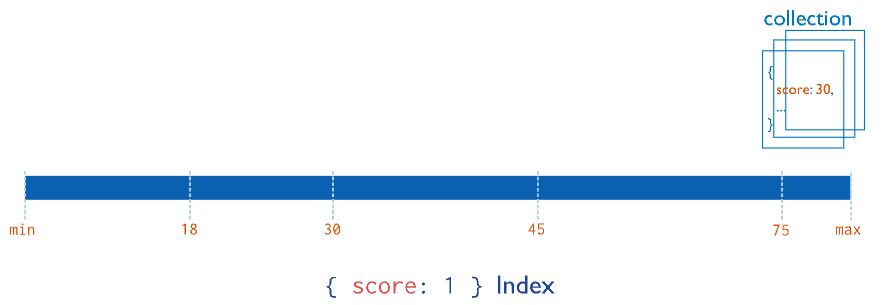
## 1 = ASC, 0 = DESC
db.customers.createIndex({ birthdate: 1 })
Add {unique:true} as a second, optional, parameter in createIndex() to force uniqueness in the index field values.
db.customers.createIndex({ email: 1 }, { unique:true })
## view indexes
db.customers.getIndexes()
2. Compound indexes
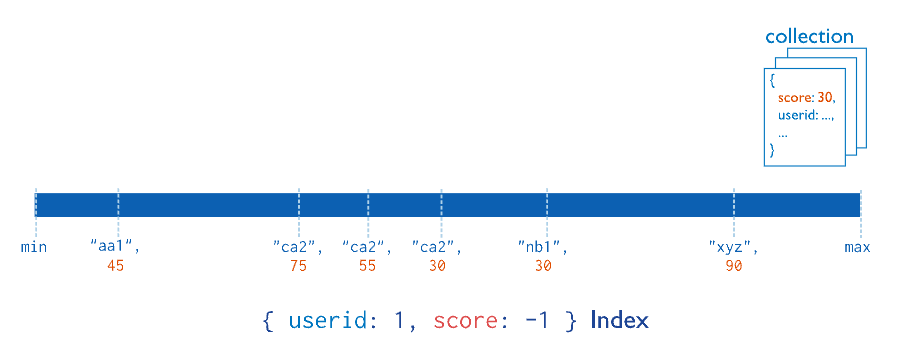
a compound index where documents are first grouped by userid in ascending order (alphabetically). Then, the scores for each userid are sorted in descending order
- The order of the fields in the index is important because it determines the order in which the documents are returned when querying the collection
- Can be a multikey index if it includes an array field (limit 1)
- The order of the fields matters when creating the index and the sort order. It is recommended to list the fields in the following order: Equality, Sort, and Range.
db.customers.createIndex({
  active:1,
  birthdate:-1,
  name:1
})
- An Index covers a query when MongoDB does not need to fetch the data from memory since all the required data is already returned by the index. ⇒ Add projection to match index to reduce MongoDb effort to fetch data
3. Multikey indexes
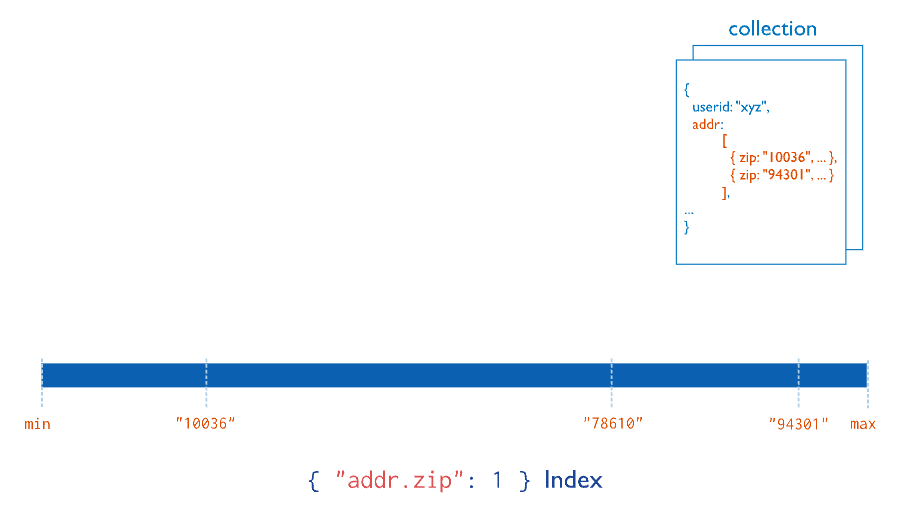
- Multikey indexes = index operate on an array field
- Multikey indexes collect and sort data stored in arrays.
- When you create an index on a field that contains an array value, MongoDB automatically sets that index to be a multikey index
db.<collection>.createIndex( { <arrayField>: <sortOrder> } )
- Both single field and compound indexes can be multikey indexes
Limitation: Only 1 field in an index can be array,
insertwill fail if this condition is violated- for example:
{ _id: 1, scores_spring: [ 8, 6 ], scores_fall: [ 5, 9 ] }

// CANNOT CREATE: { scores_spring: 1, scores_fall: 1 }
5.3. Delete indexes
- Indexes have write cost
- Recreating an index takes time and resource
- Recommend to hide the index before deleting it
Delete index by name:
db.customers.dropIndex(
  'active_1_birthdate_-1_name_1'
)
Delete index by key:
db.customers.dropIndex({
  active:1,
  birthdate:-1,
  name:1
})
Use dropIndexes() to delete all the indexes from a collection, with the exception of the default index on _id.
db.customers.dropIndexes()
The dropIndexes() command also can accept an array of index names as a parameter to delete a specific list of indexes.
db.collection.dropIndexes([
  'index1name', 'index2name', 'index3name'
  ])
5.4. Index internally
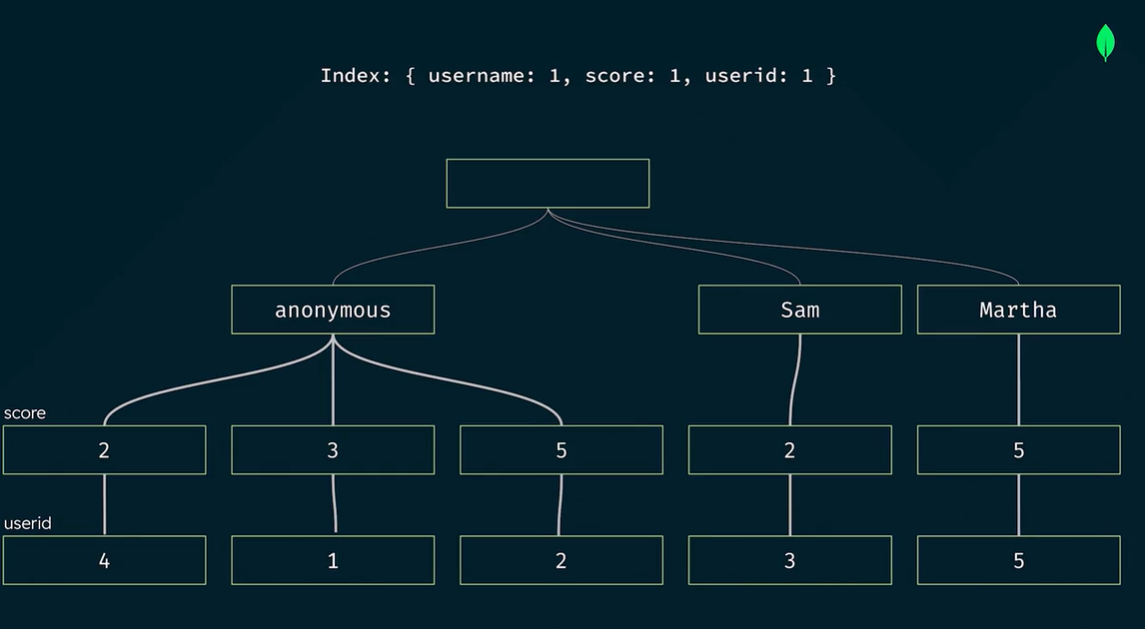
- Internally, mongoDB index use B-Tree → sort data in ascending order from left to right
- The order of the fields in the index is important (ESR “rule”) - Equality, Sort, and Range.
- Im memory sort limit memory = 100MB
- Can use
allowDiskUse()to extend this limit by using disk I/O - The presence of the
SORTstage in theexecutionStagesobject of theexplain('executionStats')output means that MongoDB had to sort the documents in memory, which can be computationally expensive.
- Can use
1. Wildcard Indexes
- To specify which fields to include or exclude in a wildcard index, set the value of a given field in a wildcard projection to
1to include or0to exclude. To include the_id, while excluding thestock, andpricefields, use the following command: - (-) Cannot use TTL on field
db.products.createIndex({ "product_attributes.$**" : 1 })

db.products.createIndex(
  { "$**": 1 },
  { wildcardProjection: { _id: 1, stock: 0, prices: 0 } }
)
2. Partial index
- Only index documents that match a filter expression
- Reduce storage requirements
- Reduced memory footprint
- _id cannot be added to partial index
## only indexes documents with a population greater than or equal to 10,000

db.zips.createIndex(
  { state: 1 },
  { partialFilterExpression: { pop: { $gte: 10000 } } }
)
3. Sparse index
- Non-sparse indexes (regular index)
- Contain entries for all documents, even those that are missing the indexed field
- Sparse indexes:
- Contain entries for documents that contain the indexed field, even if the field’s value is null
- Documents without the indexed field are not part of the index
- Index types that are sparse by default: 2D, 2Dsphere, GeoHayStack, wildcard indexes
db.sparseExample.createIndex({ avatar_url: 1 }, { sparse: true })
4. Clustered index
- Available as part of a clustered collection
- Can only be created when the clustered collection is built
- Cluster collection → improve CRUD performance
- Collections created with a clustered index
- Store documents in cluster index order
- Store the clustered index key alongside the documents
- Secondary indexes can be added to clustered collections
Non-clustered collections store documents in arbitrary order and keep index data separately
- (+) Reduced disk usage as keys are stored along with documents
- (+) Reduced I/O, improve TTL performance
- Clustered indexes can act as a Time to Live (TTL) index if the
expireAfterSecondsfield is used when creating the index, eliminating the need to create an additional TTL index on the collection.
- Clustered indexes can act as a Time to Live (TTL) index if the
- (-) Clustered indexes can only be created during the creation of a clustered collection
- (-) Only 1 clustered index per clustered collection
(-) Clustered indexes can’t be hidden, can’t be created in capped collections
- The clustered index is not automatically used by the query optimizer if a usable secondary index exists. MongoDB can be instructed to use the index, however, by appending the hint method to the query and providing the name of the internal clustered index.
6. Transactions
6.1. ACID transactions
- Atomicity
- All operations will either success or fail together
- Consistency
- All changes are made by operations are consistent with database constraints
- Example: Transaction will fail when account sum < 0
- Isolation
- Multiple transactions can happen at the same time without affecting each other
- Durability
- Changes that are made by operations in a transaction will persist, no matter what
- In mongoDB, single-document operations (ex: updateOne() ) are already atomic
- Multi document operations are not atomic by default
6.2. Multi-document ACID transaction
- MongoDB “locks” resources involved in a transaction ⇒ performance + latency penalty
- A transaction has a maximum runtime ≤ 60s after first write
const session = db.getMongo().startSession()
session.startTransaction()

const account = session.getDatabase('< add database name here>').getCollection('<add collection name here>')

//Add database operations like .updateOne() here

//
session.commitTransaction()
OR
session.abortTransaction()
7. Replication
7.1. MongoDB replica sets
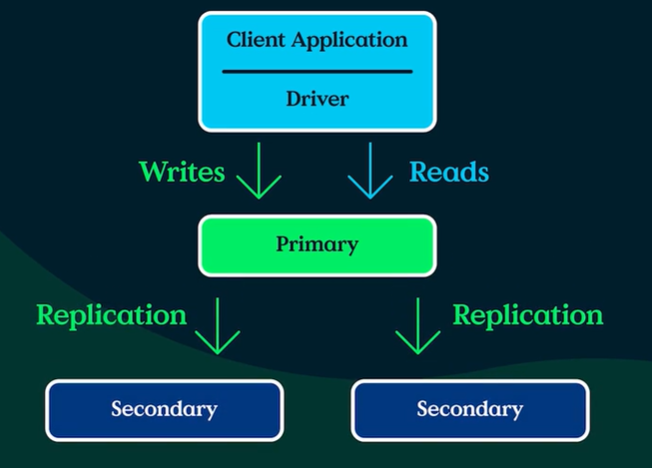
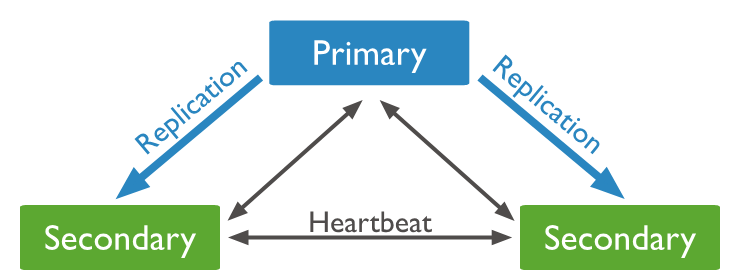
- Commonly consists of 2n + 1 instances (members) ~ 1 primary & 2n secondary nodes
- Only primary node receive write operations (oplogs)
- By default, the primary handles all read operations
- A secondary is a member that replicates the contents (oplogs) of primary member
- maximum 50 members with maximum 7 voting members
7.2. Election (Failover)
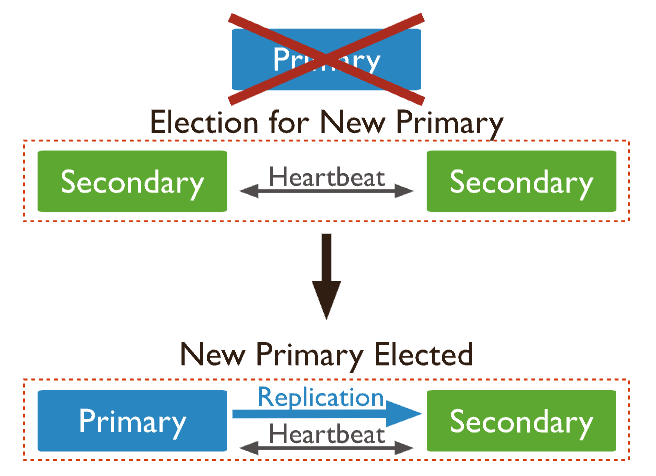
- If a primary not responding or go down ⇒ An election for new primary can be initiated
- The secondary with most votes ⇒ new primary
Old primary will rejoin the replica set as secondary node
- Each voting member casts 1 vote per election
- Maximum of 7 members can have voting privileges
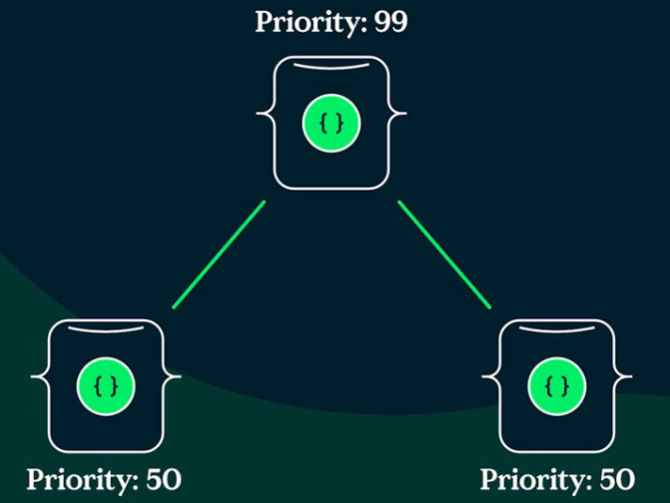
- Each node can be assign a priority value (default = 1) → more eligible to become a primary
7.3. Operation logs (oplogs)
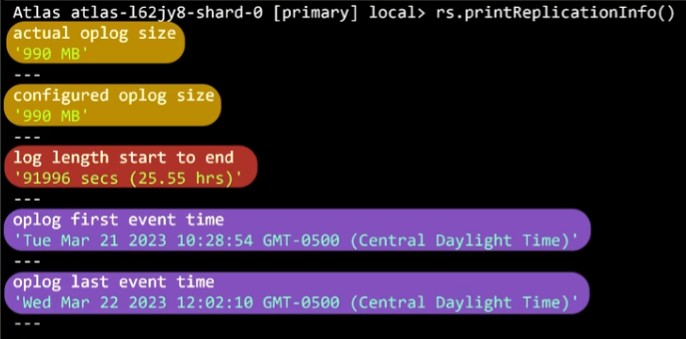
- oplog = capped collection (behaves like ring buffer)
- Usecase:
- Recovering from specific timestamp in the oplog
- Checking if the secondaries are lagging behind primary
- Determining the oplog window to avoid an initial sync when performing maintenance
- oplogs = idempotent → apply multiple times does not affect result
Replication lag:
- Can be caused by: network latency, disk throughput, long running operations, not having appropriate write concerns
- RECOVERING state: when a secondary fall too far behinds
- the member is eligible to vote but can’t accept read operations
- Start an initial sync to sync back secondary with primary
7.4. Write concerns
- Write concern = how many data-bearing members need to ack a write before it’s considered complete
- Higher levels of ack = stronger durability guarantee
- Options:
majority: a majority of members must ack<number>: the ## members needed to ack
db.cats.insertOne({ name: "Mac", color: "black", age: 6 }, { writeConcern:
{ w: "majority" , wtimeout: 3000 } });
7.5. Read concerns
- Allow to specify a durability guarantee for the documents that are returned by a read operation\
- Adjust the level of consistency and availability guarantees
- Choose between returning most recent data to the cluster / data committed by a majority of members
- Read concern level:
local: most recent data, ~availablefor replica setmajority: only data that has been ack as written to the majority of memberslinearizable: reflects successful, majority ack writes that completed before the start of the read operation
db.adminCommand({
  setDefaultRWConcern: 1,
  defaultReadConcern: { level: "majority" },
  defaultWriteConcern: { w: "majority" },
});
Read preferences:
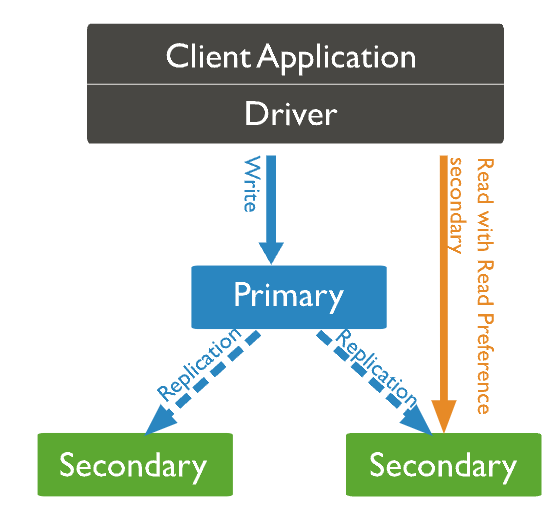
- primary
- primaryPreferred
- secondary
- secondaryPreferred
- nearest → useful for geo
8. References
- MongoDB Certification Program Study Guide - MongoDB, Inc.
- https://www.mongodb.com/docs/manual/
Leave a Comment