MySQL locks: A quick guide
Published:
Below are some notes on MySQL Locks concepts, I will not go into the very details underneath and cover every single lock type, but I will give you a quick overview of the most common locks and how they work.
Exclusive Locks (X) and Shared Locks (S)
Exclusive Locks (X)
As the name suggests, exclusive lock is a type of lock that prevents any other transaction from locking the same row.
It means that no other transaction can READ or WRITE to that resource until the lock is released (but this depends on the isolation level). InnoDB’s REPEATABLE READ allows tx to read rows with X locks (consistent read technique).
Shared Locks (S)
Shared Lock (S) allows other transactions to READ the locked object and acquire shared locks on it, but not to write to it.
It means that multiple transactions can hold shared locks on the same resource at the same time, allowing them to read the data concurrently.
Compatibility
Row lock can be either shared or exclusive. The compatibility of locks is as follows:
- Shared (S) locks are compatible with other shared locks, but not with exclusive locks (X). 1 row can have multiple shared locks at the same time.
- Exclusive (X) locks are not compatible with any other (X and S) locks. 1 row can only have one exclusive lock at a time.
Intention Locks (IS and IX)
Intention Lock is a table-level lock that indicates a transaction’s intention to acquire row-level locks on a table (either shared or exclusive). So there are 2 types of intention locks:
Intention Shared Lock (IS): a transaction intends to acquire shared locks (S) on rows in the table. E.g.,
SELECT ... FOR SHAREIntention Exclusive Lock (IX): a transaction intends to acquire exclusive locks (X) on rows in the table. E.g.,
SELECT ... FOR UPDATE
Intention locks do not lock the whole table, but they mark that there exists a transaction that wants to lock rows in this table. This allows further transactions to know that they cannot acquire conflicting locks on the table without having to check every row, which improves efficiency.
Why Intention Locks are Needed
Simply put, an intention lock isn’t used to lock the new row; it is used to ask permission to enter the neighborhood and to provide a structured way to wait in line if the neighborhood is currently blocked.
For example, when a transaction wants to insert the number 5 into a gap between 4 and 7: The row 5 does not exist yet. Since an exclusive lock (X) is a record lock (meaning it must be physically attached to and existing slot or key in the index tree), there is no physical data structure for an exclusive lock to latch onto yet. Therefore, MySQL must lock the gap (4, 7) instead.
==> Hence The insert intention lock acts as the placeholder on the gap until the physical row is created. And it allows other transactions to insert into the same gap concurrently, as long as they are not trying to insert the same value.
Lock Compatibility
| X | IX | S | IS | |
|---|---|---|---|---|
| X | X | X | X | X |
| IX | X | OK | X | OK |
| S | X | X | OK | OK |
| IS | X | OK | OK | OK |
Record Locks
Record lock is a lock on an index record (not actual data row, but its index record). E.g, SELECT ... FOR UPDATE or SELECT ... FOR SHARE will acquire record locks on the index records of the selected rows.
Note: record locks always lock index records, even if table has no index. InnoDB will create a hidden clustered index and use it for locking.
InnoDB Index
- Clustered Index: associated with the primary key (PK) of the table. The data rows are stored in the leaf nodes of the clustered index.
- If there is no PK, InnoDB will choose first UNIQUE NOT NULL column as the clustered index.
- If there is no PK + UNIQUE column, InnoDB will create a hidden clustered index.
- Secondary Index: any Indexes other than the clustered index. Each record of a secondary index contains the indexed column values and its PK.
Gap Locks
Gap lock is a lock on the gap between index records. Its main GOAL is to prevent insertion of new rows into the gap range -> preventing PHANTOM READ.
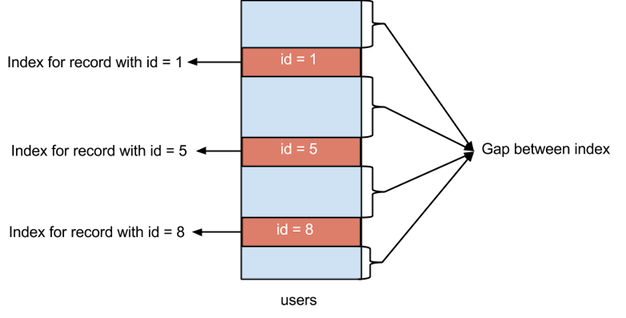
E.g, SELECT ... WHERE id BETWEEN 10 AND 20 FOR UPDATE will acquire gap locks on the range (10, 20) and prevent insertions of new rows into that range.
NOTE: Gap lock can coexist even with conflicting types. For example, transaction A can hold a shared gap lock (gap S-lock) on a gap while transaction B holds an exclusive gap lock (gap X-lock) on the same gap. Because gap locks’ only purpose is to prevent insertions, and they do not conflict with each other in terms of reading or writing existing rows.
==> There is no difference between shared (S) and exclusive (X) gap locks.
Drawback of Gap Locks
Gap locks can lead to deadlocks in certain scenarios. For example:
- Tx A holds a gap lock on (10, 20), Tx B holds a gap lock on (10, 20)
- Now Tx A wants to insert a new row with id=15, it must wait for tx B to release its gap lock.
- But Tx B also wants to insert a new row with id=12, it must wait for tx A to release its gap lock. ==> This creates a deadlock
How to avoid deadlocks caused by gap locks:
- Use lower isolation levels: consider using READ COMMITTED instead of REPEATABLE READ to reduce the use of gap locks.
- Use consistent locking order: always lock rows in the same order across transactions.
- Use short transactions: keep transactions as short as possible to reduce the chance of deadlocks.
Next-Key Locks
Next key lock is a combination of Record Lock + Gap Lock before the index record. That is, a next-key lock is an index-record lock plus a gap lock on the gap preceding the index record.
MySQL performs row-level locking on index records it scans through.
Example: given index contains 5, 9, 10, and 20. Possible next-key locks cover the following ranges: (-inf, 5], (5, 9], (9, 10], (10, 20], and (20, +inf). Query SELECT ... WHERE id > 10 FOR UPDATE will acquire next-key locks on (10, 20] and (20, +inf).
Examples
Example 1: Unique Index vs Non-Unique Index
Assume an InnoDB index (REPEATABLE READ) contains: 10, 20, 30, 50
- Query:
SELECT ... WHERE id = 20 FOR UPDATE;- On an UNIQUE index, InnoDB will acquire a record lock only on
20. No gap lock is needed because a unique index guarantees that no additional row with id = 20 can be inserted. - On a non-unique index, InnoDB will acquire a next-key lock on
(10, 20]and a record lock on20to prevent insertion of new rows with id = 20.
- On an UNIQUE index, InnoDB will acquire a record lock only on
- Query:
SELECT ... WHERE id BETWEEN 15 AND 35 FOR UPDATE;InnoDB will acquire next-key locks on the ranges
(10, 20]and(20, 30], which also locks the rows20and30(record locks).Using next-key lock, the resulting behavior is as follows:
- Block Insert inside gap:
INSERT ... VALUES (25); - Block Update locked record:
UPDATE ... WHERE age = 30; - Block Move into gap:
UPDATE ... SET age = 25 WHERE age = 10;
- Block Insert inside gap:
Conditions for using next-key locks:
- The table uses InnoDB and isolation level is
REPEATABLE READ. - The statement is a locking operation such as
SELECT ... FOR UPDATE,UPDATE, orDELETE. - The query performs a range or nonunique-index scan.
- The execution plan uses the relevant index.
A plain SELECT normally uses an MVCC snapshot (I will cover this in another topic about MySQL’s isolation level) and does not acquire these locks. An exact lookup using a complete unique index usually acquires only a record lock.
Example 2: Full Table Scan and Locks
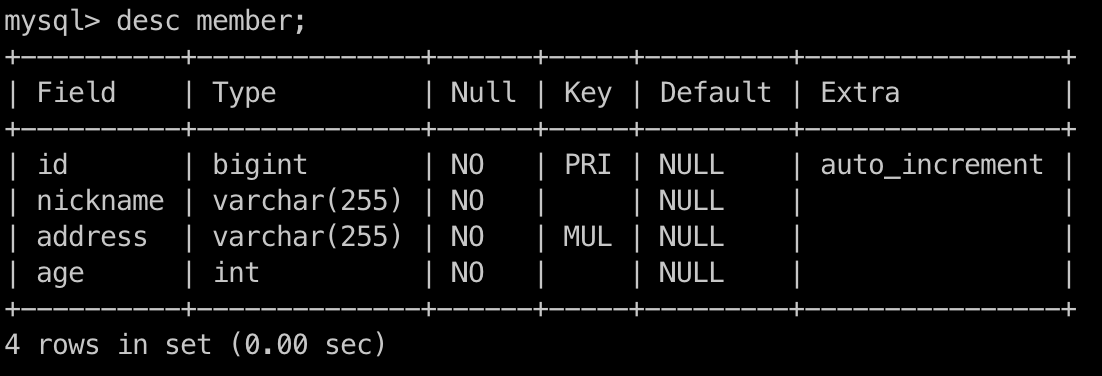
Assume a table with index on column address but not nickname. The table definition is as follows:
- Query:
UPDATE member SET age = 30 WHERE address='HN' AND nickname='T';- Since there is no index on
nickname, InnoDB will perform a full table scan and acquire next-key locks on all rows that match the conditionaddress='HN'. In this case, all write operations withaddress='HN'will be blocked until the transaction is committed or rolled back. ==> This can impact concurrency performance.
- Since there is no index on
What happens if the table does not have an index? In this case, the UPDATE operation is performed by full scanning the table, and locks are set on all table records.
==> So index could affect not only query performance but also concurrency performance, and must be designed well to avoid unnecessary locks.
Example 3: How INSERT works with locks
Assume application performs multiple INSERT operations simultaneously with the same PK value. For example, two transactions try to insert a row with id=10 at the same time:
--- TX1
INSERT INTO users(id) VALUES (10);

--- TX2
INSERT INTO users(id) VALUES (10);
Locks Acquired by INSERT:
- an insert-intention lock on the target index gap ==> allows other transactions to insert into the same gap concurrently
- an exclusive record lock (X) on the inserted row
So, without loss of generality, assume T1 inserts the row and holds an exclusive lock (X) on id = 10. Hence T2 must wait, and when T1 commits, T2 will try to insert the same row but fails because of duplicate key error.
Leave a Comment