Kafka Message compression
Published:
This article explains how Kafka message compression works, its configuration, and considerations for both producers and consumers.
Introduction
Kafka producer data compression works by batching data going to the same partition before applying compression.
- Batching: Kafka producers group records destined for the same partition into record batches, then compress each batch as a unit.
- Compression Type: The chosen compression algorithm (e.g., Snappy, Gzip) affects performance.
- Decompression: Brokers usually store producer-compressed batches using the original codec. They may decompress or recompress batches during validation, log compaction, message-format conversion, or when the broker/topic configuration enforces another compression codec.
Batch size trade off:
- Small Batch Size: Saves memory, reduces latency (good for low-throughput, low-latency scenarios).
- Large Batch Size: Increases throughput, but consumes more memory (good for high-throughput scenarios).
Compression Types

Kafka Producer Configuration
compression.type: The compression algorithm to use. batch.size: The maximum size of a batch before compression. linger.ms: The time to wait for more messages before sending a batch. max.request.size: The maximum producer request size. A request may contain multiple partition batches, and this setting also effectively limits the maximum uncompressed record-batch size.
Kafka consumers: Handling mixed data dynamics
TLDR, you don’t need to config anything on the consumer side to handle compressed messages.
Kafka’s architecture ensures that consumers do not need to know which supported compression codec a producer used. Compression and decompression are handled transparently by the Kafka client. However, consumers must still use the correct key and value deserializers for the application’s data format.
- Compatibility
- A single consumer can read from a topic partition containing a mix of both compressed and uncompressed messages
- Impact: You can upgrade producers individually or change compression types on the fly without breaking or restarting downstream consumer applications.
- Consumer Handling
- Each record batch contains compression metadata in its batch attributes. The Kafka consumer client reads this metadata and automatically decompresses the batch before deserializing and returning individual records.
- The consumer checks these flags automatically. If the bits indicate the batch is compressed, the consumer looks up the designated compression codec in memory, unpacks the payload, and presents pure, readable records to the application loop. No manual decoding code is required by the developer.
- Decoupling Advantage
- Kafka’s design allows decoupling between producers and consumers, facilitating the handling of mixed message types.
- Producers can choose compression based purely on their own environmental limits (like restricted network bandwidth). Consumers remain entirely unaffected by this choice because the underlying Kafka client wrapper handles the heavy lifting transparently.
Kafka Compression Flow: Producer -> Broker -> Consumer
Compression changes how records are transferred and stored, but the Kafka’s core model remains the same: offsets are assigned to records, and consumers read records in-order from a given offset. The compression flow is as follows:
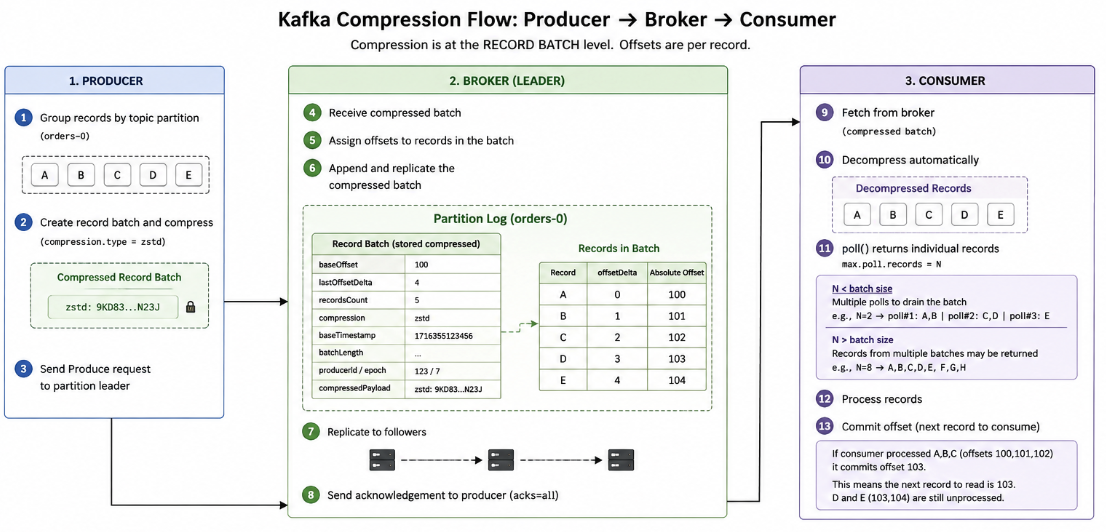
When the producer builds a record batch, it gives records sequential deltas of offsets and these record structures are then compressed together. for example:
Producer batch:

Record A → offsetDelta = 0
Record B → offsetDelta = 1
Record C → offsetDelta = 2

lastOffsetDelta = 2
How offset is assigned per batch?
- Broker assigns a base offset to the batch (e.g, 100)
- Each record gets an offset = baseOffset + offsetDelta
How batch is stored in broker?
- Broker stores the batch as a single compressed unit with metadata
- Offsets are logical and preserved via baseOffset
Notes
- Encrypted data should not be compressed since data is random.
Leave a Comment